Even Better GitHub Actions For Your Spin Apps
The gh plugin for Spin CLI has been around for quite some time now, and I hope it has served you well so far. In this short post, I’ll guide you through the most recent changes I added to spin gh create-action.
What is the spin gh Plugin
The main purpose of the spin gh plugin is to generate full-fledged GitHub Actions for your Spin applications.
The plugin does not rely on conventions, because repository structures differ dramatically. Instead, it discovers all Spin applications recursively underneath its working directory. Inspecting each application allows the plugin to identify which tools must be installed to successfully compile all applications.
Deployment to Akamai Functions has been possible for quite a while now. With its recent 0.2.1 release, it can also push OCI artifacts for all your Spin applications to OCI-compliant registries.
On top of that, you can opt in to OCI artifact signing and Software Bill of Materials (SBOM) generation.
We tried to come up with reasonable defaults to ensure generated GitHub Actions work for the majority of scenarios. However, if the generated GitHub Action does not meet your expectations or regulatory compliance, you can always “eject” the default template and change it according to your requirements. As a result, the spin gh plugin is a fully customizable GitHub Actions generator for Spin applications.
Installing the Latest Version of the gh Plugin
Obviously, you must have the Spin CLI and the latest version of the gh plugin installed on your system. Although it is not a strict requirement, I highly encourage you to install the latest stable release of Spin (4.2.1 at the time of writing this post).
To upgrade (or install) the latest version of the gh plugin for Spin, you can use the following commands:
# Update the plugin index
spin plugins update

# Upgrade (or Install) the gh plugin
spin plugins upgrade gh --yes

# Check installed version of Spin plugins
# For gh this should report 0.2.1
spin plugins list --installed
gh 0.2.1 [installed]
Scaffolding Demo Apps
For demonstration purposes, we’ll create a monorepo with two independent Spin applications. app-one will be a Rust-based application, while app-two will use TypeScript.
Let’s create a new folder and scaffold both demo applications:
# Create a new top-level folder
mkdir the-new-spin-gh
cd the-new-spin-gh

# Scaffolding the 1st Spin app
spin new -t http-rust --no-vcs -a app-one

# Scaffolding the 2nd Spin app
spin new -t http-ts --no-vcs -a app-two
As this is all about GitHub Actions, let’s create a new GitHub repository (usually, I prefix these kinds of repositories with tmp-- or delete-me--). If you are coding along, you can choose a more realistic or meaningful name:
# Init the Git repository
git init

# Create a new GitHub repository
gh repo create tmp--the-new-spin-gh \
  -d "Exploring latest features of spin gh" \
  --public \
  --source .
Let’s add, commit, and push our two demo applications:
# Create a simple README
echo '# Exploring latest features of spin gh' >> README.md

# Use git to do git things
git add .
git commit -sm 'chore: Add two sample applications'
git push -u origin main
The Basics
You can use the spin gh create-action command to generate a new GitHub Actions workflow file. The command has a massive number of flags allowing you to customize almost everything, from events that should trigger your workflow to tool versions, all the way down to Spin plugins that must be installed on the runner.
Just give it a try. By appending the dry-run flag (spin gh create-action --dry-run), you’ll get a preview rendered to stdout instead of writing it to disk.
You can generate a pretty standard CI workflow for our demo applications using the following command:
spin gh create-action \
  --ci main \
  --name "Demo Apps CI"
By default, this will create a new GitHub Actions workflow file at .github/workflows/ci.yaml. Without opting in to any shiny new features, we end up with the following pipeline:
name: "CI"
on:
  push:
    branches:
      - "main"
env:
  RUST_VERSION: "1.98.1"
  RUST_TARGET: "wasm32-wasip2"
  NODE_VERSION: "26"
jobs:
  spin:
    runs-on: "ubuntu-latest"
    name: Build Spin App
    permissions:
      contents: read
    steps:
      - uses: actions/checkout@v4
      - name: Install Rust
        uses: dtolnay/rust-toolchain@stable
        with:
          toolchain: "${{ env.RUST_VERSION }}"
          targets: "${{ env.RUST_TARGET }}"
      - name: Install Node.js
        uses: actions/setup-node@v4
        with:
          node-version: "${{ env.NODE_VERSION }}"
      - name: Install Spin
        uses: fermyon/actions/spin/setup@v1
        with:
          github_token: ${{ secrets.GITHUB_TOKEN }}
      - name: Build app-one
        run: spin build
        working-directory: ./app-one
      - name: Build app-two
        run: spin build
        working-directory: ./app-two
The plugin figured out that Rust and Node.js are required. It installed the latest Spin CLI and compiled each Spin application by running spin build in the correct working directory. Neat, but building is only half the story.
Publishing Spin Apps as OCI Artifacts
The first new feature is behind the --push-oci-artifacts flag. It adds all the steps necessary to publish your Spin app(s) to an OCI registry as part of your workflow:
spin gh create-action --ci main \
  --name "Demo Apps CI" \
  --push-oci-artifacts \
  --overwrite
In contrast to most other flags, --push-oci-artifacts can’t figure out everything on its own. Where should your apps be published? Which tag(s) do you want to use? Does the registry require authentication? Those are decisions only you can make. That’s why the plugin presents an interactive Terminal User Interface (TUI) and walks you through the configuration—one app at a time. Here’s what you’ll be asked for every discovered Spin app:
- Artifact name - The full repository path of your artifact, without a tag (for example,
ghcr.io/thorstenhans/tmp-app-one). This one is required. - Tags - Which tag(s) should be published on every run? You can pick from
latest, the commit SHA (one immutable tag per commit), both, or provide your own custom tag(s). If you go for custom tags, the plugin asks for a comma-separated list next (for example,v1.0.0, staging). - Authentication - Does the target registry require authentication? If you say yes, the plugin asks for the login server and the username to use. It won’t ask for the corresponding password or token; instead, it will inject a GitHub repository secret.
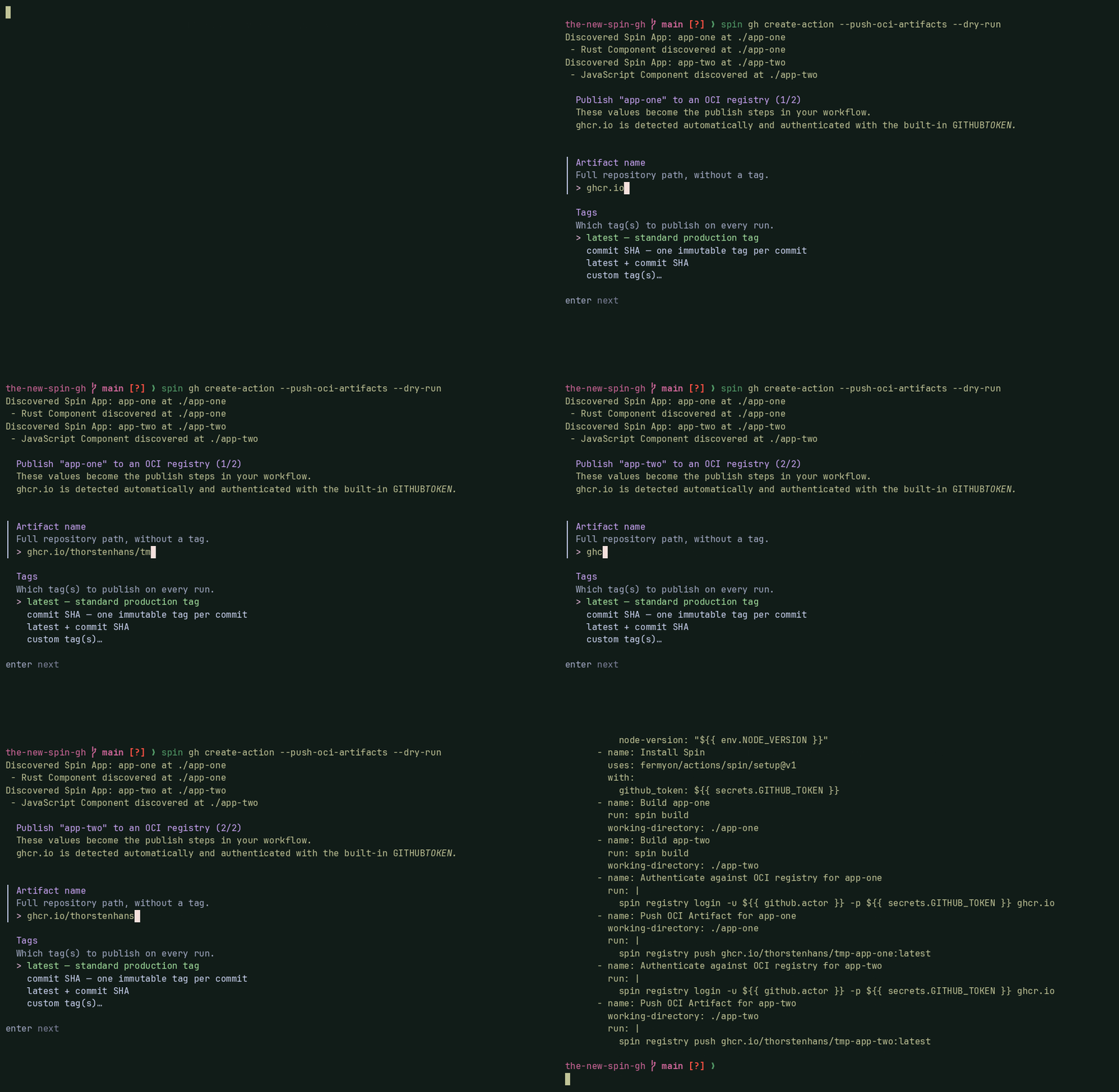
There’s one convenient shortcut baked in: whenever your artifact name points to the GitHub Container Registry (prefixed with ghcr.io), the plugin detects it automatically and authenticates using the built-in GITHUB_TOKEN. No extra questions, no extra secrets. That’s exactly the path I picked for both demo apps.
With those answers in place, the plugin adds a packages: write permission and appends the publish steps for both apps:
name: "CI"
# ...
jobs:
  spin:
    # ...
    permissions:
      contents: read
      packages: write
    steps:
      # ...
      - name: Authenticate against OCI registry for app-one
        run: |
          spin registry login -u ${{ github.actor }} -p ${{ secrets.GITHUB_TOKEN }} ghcr.io
      - name: Push OCI Artifact for app-one
        working-directory: ./app-one
        run: |
          spin registry push ghcr.io/thorstenhans/tmp-app-one:latest
      - name: Authenticate against OCI registry for app-two
        run: |
          spin registry login -u ${{ github.actor }} -p ${{ secrets.GITHUB_TOKEN }} ghcr.io
      - name: Push OCI Artifact for app-two
        working-directory: ./app-two
        run: |
          spin registry push ghcr.io/thorstenhans/tmp-app-two:latest
That’s it—every push to main now builds and publishes both apps to GitHub Container Registry.
Keyless OCI Artifact Signing with cosign
Publishing artifacts is great, but how do your consumers know an artifact really came from your pipeline and wasn’t tampered with? That’s what the --sign flag is for. It uses cosign to keylessly sign your OCI artifacts, leveraging the OIDC identity of your GitHub Actions workflow—no long-lived signing keys to manage or leak.
spin gh create-action --push-oci-artifacts --sign --overwrite
Note that --sign builds on top of OCI publishing. If you forget --push-oci-artifacts, the plugin will terminate and yell at you.
The interactive TUI is exactly the same as before. On top of the publish steps, the plugin now grants the workflow the id-token: write permission (required for keyless signing), installs cosign, additionally authenticates against the OCI-compliant registry using docker, and adds a signing step per artifact:
name: "CI"
# ...
jobs:
  spin:
    # ...
    permissions:
      contents: read
      packages: write
      id-token: write
    steps:
      - name: Install Cosign
        uses: sigstore/cosign-installer@v3
        # ...
      - name: Authenticate against OCI registry for app-one
        run: |
          spin registry login -u ${{ github.actor }} -p ${{ secrets.GITHUB_TOKEN }} ghcr.io
          docker login -u ${{ github.actor }} -p ${{ secrets.GITHUB_TOKEN }} ghcr.io
      - name: Push OCI Artifact for app-one
        # ...
      - name: Sign OCI Artifact for app-one
        working-directory: ./app-one
        run: |
          cosign sign --yes ghcr.io/thorstenhans/tmp-app-one:latest
      - name: Authenticate against OCI registry for app-two
        run: |
          spin registry login -u ${{ github.actor }} -p ${{ secrets.GITHUB_TOKEN }} ghcr.io
          docker login -u ${{ github.actor }} -p ${{ secrets.GITHUB_TOKEN }} ghcr.io
      - name: Push OCI Artifact for app-two
        # ...
      - name: Sign OCI Artifact for app-two
        working-directory: ./app-two
        run: |
          cosign sign --yes ghcr.io/thorstenhans/tmp-app-two:latest
SBOM Generation and Vulnerability Scanning with trivy and oras
The last new feature is the --sbom flag. It brings a complete software supply chain story to your workflow. It generates a Software Bill of Materials (SBOM), scans it for critical vulnerabilities, and attaches the SBOM right next to your OCI artifact so consumers can inspect it later.
To achieve this, two new tools are added to the GitHub Actions workflow file: trivy generates the SBOM (in SPDX JSON format) and scans it, and oras attaches the SBOM to the published artifact.
Just like --sign, the --sbom flag requires --push-oci-artifacts.
spin gh create-action --push-oci-artifacts --sign --sbom --overwrite
Again, the interactive UI is unchanged. Under the hood, the plugin installs the required tools, generates and scans the SBOM before pushing, and attaches it after:
name: "CI"
# ...
jobs:
  spin:
    # ...
    steps:
      - name: Install trivy
        uses: aquasecurity/setup-trivy@e07451d2e059ed86c2870430ea286b3a9e0bf241
      - name: Install ORAS
        uses: oras-project/setup-oras@v1
        # ...
      - name: Generate SBOM for app-one
        working-directory: ./app-one
        run: |
          trivy fs --format spdx-json -o sbom.spdx.json .
      - name: Scan app-one SBOM for Critical Vulnerabilities
        working-directory: ./app-one
        run: |
          trivy sbom --exit-code 1 --severity HIGH,CRITICAL sbom.spdx.json
      - name: Authenticate against OCI registry for app-one
        # ...
      - name: Push OCI Artifact for app-one
        # ...
      - name: Sign OCI Artifact for app-one
        # ...
      - name: Attach app-one SBOM via ORAS
        working-directory: ./app-one
        run: |
          oras attach --artifact-type application/spdx+json ghcr.io/thorstenhans/tmp-app-one:latest sbom.spdx.json

      - name: Generate SBOM for app-two
        working-directory: ./app-two
        run: |
          trivy fs --format spdx-json -o sbom.spdx.json .
      - name: Scan app-two SBOM for Critical Vulnerabilities
        working-directory: ./app-two
        run: |
          trivy sbom --exit-code 1 --severity HIGH,CRITICAL sbom.spdx.json
      - name: Authenticate against OCI registry for app-two
        # ...
      - name: Push OCI Artifact for app-two
        # ...
      - name: Sign OCI Artifact for app-two
        # ...
      - name: Attach app-two SBOM via ORAS
        working-directory: ./app-two
        run: |
          oras attach --artifact-type application/spdx+json ghcr.io/thorstenhans/tmp-app-two:latest sbom.spdx.json
Notice that the vulnerability scan uses --exit-code 1 --severity HIGH,CRITICAL. In other words, if trivy finds a HIGH or CRITICAL vulnerability, the workflow fails and nothing gets published. Exactly what you want as a safety net.
Deployment to Akamai Functions
Although this feature already landed in an earlier version of the gh plugin, it’s worth mentioning here as well. By appending the --deploy-to-akamai-functions flag, you can instruct the spin gh create-action command to scaffold all necessary steps for deploying your apps straight to an Akamai Functions account.
Conclusion
With --push-oci-artifacts, --sign, and --sbom, the gh plugin for Spin CLI now covers the full journey from source code to a published, signed, and documented OCI artifact—without having to hand-craft a single line of YAML. The interactive UI keeps the publishing configuration approachable, while the generated workflow follows supply chain best practices out of the box.
Happy shipping!